¶ Check latest versions here
In this tutorial, we will guide you through the process of updating your Yarbo's App, Firmware, and Data Center (DC) to keep your device running smoothly and efficiently.
¶ Updating the Yarbo App
Your Yarbo App is your primary interface with Yarbo, and keeping it updated is essential for accessing the latest features and improvements.
¶ For iOS Users (Apple App Store)
- Open the App Store on your iOS device.
- Tap on your profile icon located at the top right corner of the screen.
- Scroll down to see the list of apps with available updates.
- Find the Yarbo App in the list and tap the Update button next to it.
¶ For Android Users (Google Play Store)
- Open the Google Play Store on your Android device.
- Tap the Menu button (three horizontal lines) in the top left corner.
- Select My apps & games.
- Find the Yarbo App in the list of apps with updates available.
- Tap the Update button next to the app.
¶ Updating Yarbo Firmware
Firmware updates are crucial for the performance and stability of your Yarbo.
- Ensure your Yarbo is powered up and has an active network connection.
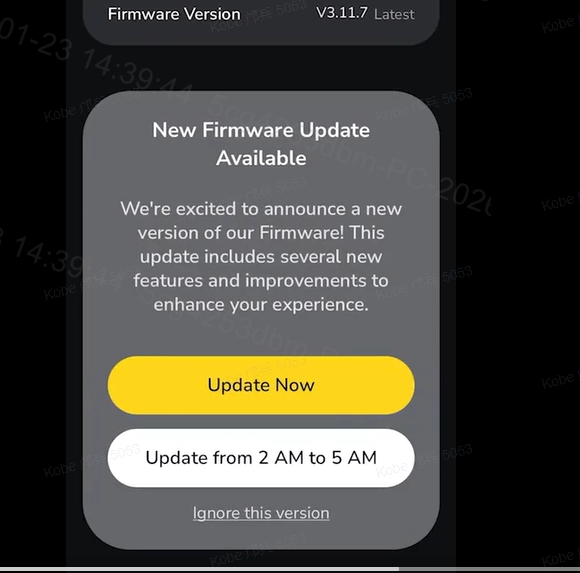
- Automatic Updates: Yarbo firmware updates are designed to be automatic. Once connected to the internet, your Yarbo will check for updates and download them in the background.
- You can choose one of the following options:
|
 |
¶ Updating the Data Center (DC)
The Data Center is the backbone of your Yarbo's operations, and keeping it updated ensures that your Yarbo has the latest data and functions optimally.
- Open the Yarbo App on your smartphone.
- Navigate to the Data Center Settings page within the app.
- Enable Bluetooth: Make sure Bluetooth is turned on in your phone's settings to establish a connection with your Data Center.
- Connect to Your Data Center: Click to connect to your Yarbo Data Center via Bluetooth.
- Access Data Center Version Page: Once connected, go to the Data Center version page in the app.
- Download the Latest Version: From this page, you should be able to download the latest Data Center version from the server.
- Upload to Data Center: After downloading the latest version, upload it to your Data Center to ensure it's running the most current software.
¶ Troubleshooting Tips
- If your Yarbo firmware fails to update automatically, please first ensure that your Yarbo is connected to a stable internet connection. If the issue persists, contact Yarbo Support for further assistance.
By following these steps, you can keep your Yarbo up-to-date, ensuring that you have the best possible experience with your Yarbo. Regular updates not only improve performance but also enhance security and add new features that can enrich your interaction with your Yarbo.