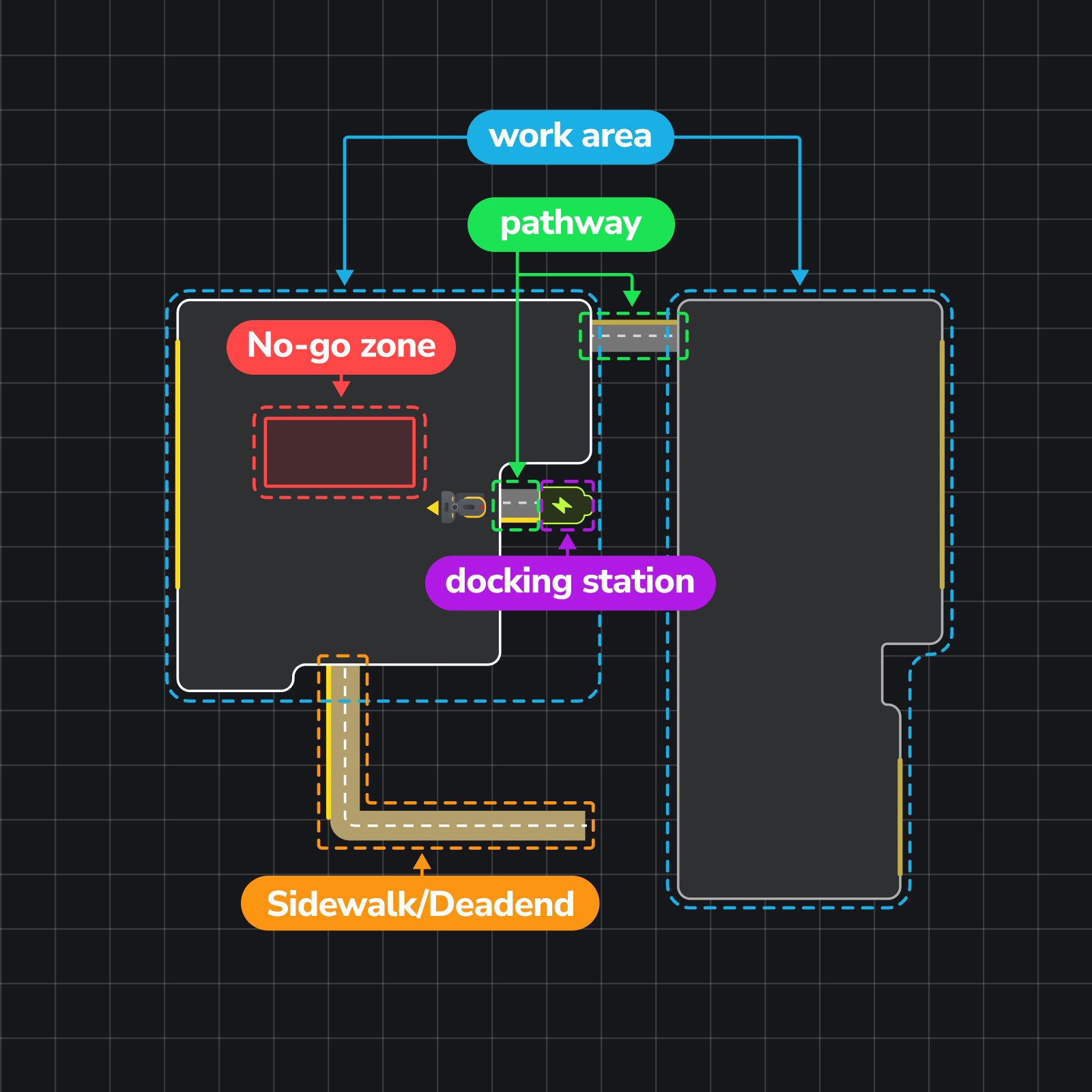
In the Yarbo app, there are several key map elements that help Yarbo navigate and operate efficiently, including Work Area, Pathway and Sidewalk etc. Each element serves a different purpose to help Yarbo move, navigate, and complete tasks more effectively.
Let’s take a closer look at how each one works below. 👇
¶ Pathway
- The Pathway serves as a route that connects Yarbo’s docking station to a designated Working Area. This route enables Yarbo to travel between the docking station and the Working Area for tasks and recharging. Pathways can also connect two separate Working Areas, providing flexibility in Yarbo’s operating zones. To function properly, a Pathway must connect at both ends to either a Working Area or the docking station.
¶ Work Area
- The Work Area defines the specific space Yarbo is assigned to maintain. Within this area, Yarbo will plan and follow an optimal route to ensure complete coverage while staying within set boundaries.
- This area must be fully enclosed and connected to the docking station by a Pathway. You won’t need to define a route for Yarbo; simply mark the boundary of the Working Area by driving Yarbo along its perimeter.
- When using the Snow Module, mark specific snow-throwing edges around the Working Area. These edges indicate where Yarbo should throw snow outside the designated area, ensuring effective snow clearance.
¶ Sidewalk for Snow Blower
- A Sidewalk is a special mapping feature designed for narrow areas that closely match Yarbo’s width.
- It works as a Work Area in system logic. But instead of automatically generating a route, Yarbo follows the exact driving path created by the user during mapping for more precise movement in tight spaces.
- A Sidewalk must connect to at least one Working Area, but unlike a standard Pathway, it does not need to connect at both ends and can end openly.
- When operating inside a Sidewalk, Yarbo supports two turning modes, allowing users to freely choose their preferred option:
- Straight in & straight out without turning around inside the area
- Zero-turn behavior
- This design gives users greater flexibility and allows Yarbo to maintain more accurate and predictable movement in narrow spaces.
¶ Deadend for Lawn Mower/Lawn Mower Pro
- A Deadend is designed for narrow areas where Yarbo does not have enough space to turn around during mowing. It is typically a path close to the width of the Yarbo itself.
- One end must connect to a working area or pathway, while the other end can remain unconnected. When processing a Deadend, Yarbo will move straight in and straight out without turning around inside the narrow area.
¶ Docking Station
- The docking station for Yarbo serves a dual purpose: it functions as the charging station, marked by a green battery icon on the map, and it acts as the starting point for executing work plans. If the docking station needs to be moved, be sure to update its position on the map by selecting the option to reinstall the docking station.
- The Docking Station can only be placed outside of a Work Area and must be connected through a Pathway. Users can configure multiple Docking Stations within a map, but only one Docking Station can be activated and used at a time.
¶ No-go Zone
- The "No-go Zone" refers to enclosed areas within the Working Area where Yarbo is restricted from entering. These zones typically include spaces like swimming pools, flowerbeds, restricted areas, or large obstacles that could interfere with Yarbo's operation.